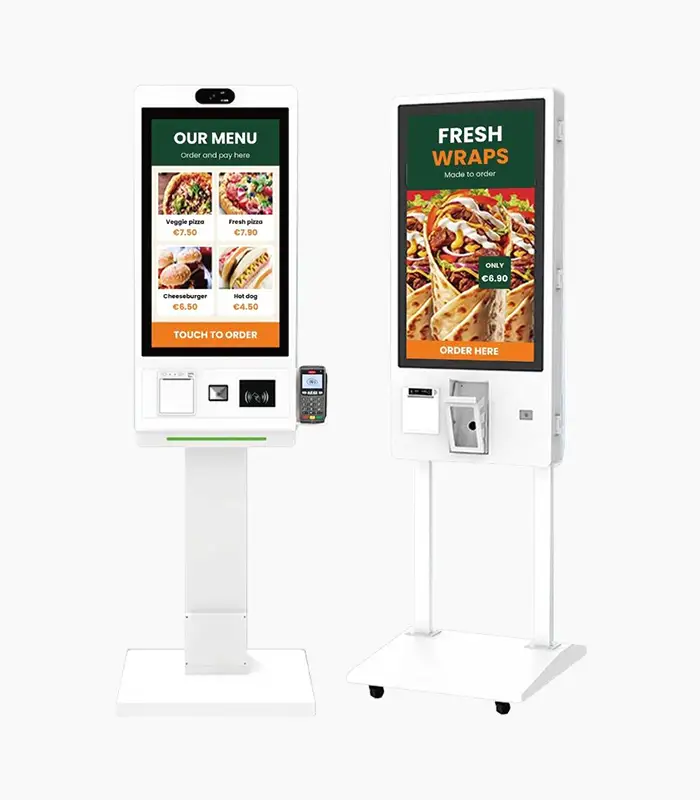
LCD Self-Ordering Kiosk

The LCD Self-Ordering Kiosk is a self-service screen with built-in thermal printer and QR scanner, space for a POS device and five sizes from 18.5 to 32 inches.

Category:
Maximum pixel capacity icon

5 sizes

From 18.5 to 32 inches

Video decoding icon

Printer and scanner

Built-in thermal printer and QR code scanner

Operating system icon

POS-ready

Reserved space for a POS device

Ingress protection icon

Windows or Android

Operating system

Order. Pay. Done.

LCD Self-Ordering Kiosk: customers choose and pay on their own, and your team gets back to serving.

LCD Self-Ordering Kiosk on a wheeled stand showing a food promotion in a restaurant

Technical specifications

All the details for your project.

This LCD display kiosk comes in five optional screen sizes: 18.5, 21.5, 24, 27 and 32 inches. It has a built-in thermal printer and QR code scanner, and a reserved space for a POS device. A built-in camera and an NFC card reader are available as options. The operating system is Windows or Android. It can be mounted with a wall or floor standing bracket, both optional. It carries CE and RoHS certification.

LCD Self-Ordering Kiosk for Shorter Queues

The LCD Self-Ordering Kiosk lets customers choose and pay on their own, without waiting in line. It turns the counter into a self-service point and gives your staff time for preparing, serving and welcoming people, which is where a shop or a restaurant earns its reputation.

In a busy place the queue forms at the counter, and every customer who waits is a customer who may leave. A kiosk adds more places to order without adding more staff behind the till. People read the offer at their own pace, change their mind without feeling rushed and pay when they are ready.

Where you put the kiosk decides how well it works. Place it where the queue forms, near the entrance or beside the counter, so that customers see it before they join a line. Leave enough room around it for two people to use neighbouring kiosks, and keep it in view of your staff, who can help anyone who is unsure.

Think about who will use it and how. A smaller screen is enough for a quick order at a counter, while a larger one reads better from a distance in a crowded hall. Choose the size from the way people will approach the kiosk, then choose the mounting from the space you have: on the wall in a narrow shop, on the floor in an open room.

Before the installation, prepare what will appear on the screen: the menu or product list, prices, photos and offers. A short, clear list of choices makes ordering faster than a long one. Our sales team can help you plan the setup, from the screen size to the payment device you want to use.


LCD Self-Ordering Kiosk with a portrait menu screen and card reader in a restaurant

Key benefits of the LCD Self-Ordering Kiosk

Shorter queues

Customers order side by side instead of one after the other.

More time for your staff

People behind the counter prepare, serve and advise.

Everything in one place

Receipt, code reading and payment terminal share a single body.

Fits your space

The same kiosk works on a wall in a small shop or on the floor in a large room.

Familiar software

Your team works with Windows or Android, as it already does.

Applications for the LCD Self-Ordering Kiosk

LCD Self-Ordering Kiosk used by a customer to order at a coffee store entrance

Coffee stores

The morning rush at the entrance, with a short list of drinks and combos.

LCD Self-Ordering Kiosk showing food products in a specialty store

Specialty stores

Customers who prefer to browse and choose alone, without asking.

LCD Self-Ordering Kiosk used by a couple to choose dishes in a restaurant

Restaurants

Menus with photos, so guests choose calmly before the kitchen starts.

LCD Self-Ordering Kiosk for ordering snacks and drinks in a cinema lobby

Cinemas

Quick orders of snacks and drinks while the line for the next screening forms.

LCD Self-Ordering Kiosk used for contactless payment near a store exit

Stores

A fast payment point near the exit for customers with few items.

LCD Self-Ordering Kiosk with a pizza menu in a pizzeria with a PIEFFE oven

Pizzerias

Ordering and payment at the entrance, leaving staff free to bake fresh pizzas in the PIEFFE oven.

Certification and support

It carries CE and RoHS certification. Dison Europe supports you before and after the purchase: tell us about your space, your customers and your payment setup, and our sales team will help you choose the right size and configuration.

LCD Self-Ordering Kiosk FAQ

What is an LCD Self-Ordering Kiosk?

It is a self-service station where customers choose products and pay without waiting at the counter.

What sizes does the LCD Self-Ordering Kiosk come in?

Five optional sizes: 18.5, 21.5, 24, 27 and 32 inches.

Which operating system does the kiosk use?

Windows or Android.

Does it print receipts and read QR codes?

Yes. A thermal printer and a QR code scanner are built in.

Can I add a POS device?

Yes. The kiosk has a reserved space for it.

Does the kiosk have a camera or an NFC reader?

Both are available as options.

Can the kiosk be fixed to a wall?

A wall-mounted or floor standing bracket is available as an option.

Where can I use an LCD Self-Ordering Kiosk?

In coffee stores, specialty stores, restaurants, cinemas, stores and fruit shops.

How do I choose the right size?

Choose it from the distance people will read it from and the space you have, then contact us and we will help you decide.

Does the kiosk replace my staff?

No. It takes over ordering and payment, so your staff can prepare, serve and help customers.

Pre-sales and after-sales support

We support you at every stage of the project, from consulting to maintenance.
Personalized consulting icon

Personalized consulting

Needs analysis and technical support for every project.

Regulatory support icon

Regulatory support

Assistance with permits, certifications and compliance.

Optimization icon

Optimization

Tailored solutions to maximize performance and your investment.

After-sales support icon

After-sales support

Dedicated service and spare parts available over time.

Suggested products

Get product news and technical updates

Product launches, technical guides and support news from Dison Europe, straight to your inbox.

By subscribing, you agree to receive our newsletter and accept our Privacy Policy. You can unsubscribe at any time.